Create Dreamcore and Liminal Space Visuals
Turn a familiar transitional place into a quiet, dreamlike scene, then use restrained camera motion to let viewers notice its repetition, emptiness, and subtle unease.
Best for: ambient scenes · music visuals · atmospheric transitions
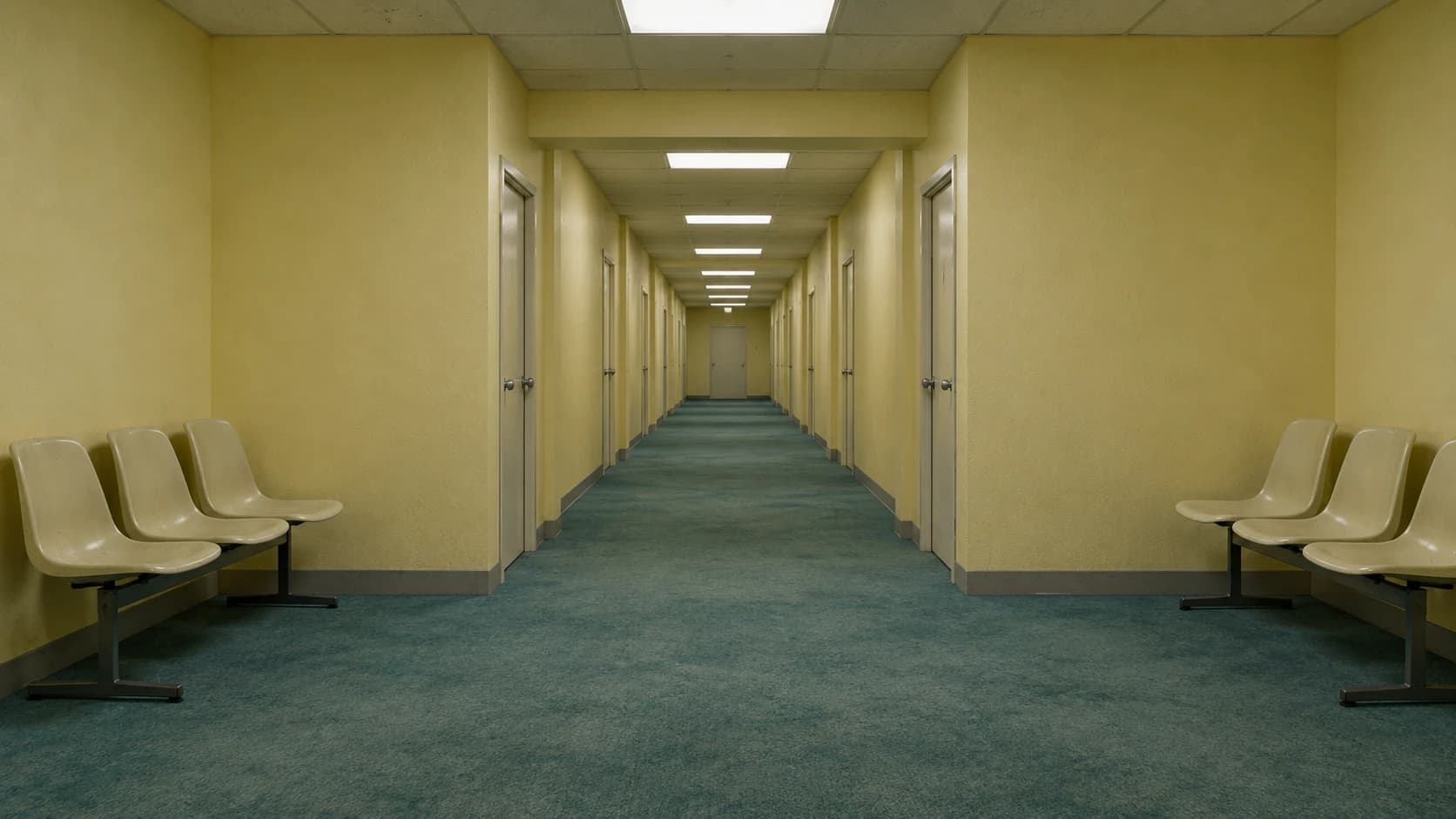
What defines the look
Composition
Use a central vanishing point, repeated fixtures, and an in-between place such as a corridor, waiting room, stairwell, or entrance.
Color
Use faded institutional colors or an intentionally strange but limited palette. Avoid unrelated accents that turn the scene into visual noise.
Light
Keep one coherent artificial-light system. Steady fluorescent illumination can create nostalgia without relying on aggressive horror effects.
Material
Combine familiar surfaces—painted walls, carpet, molded chairs—with mild wear and subtle low-fidelity texture.
Motion
Use one slow push or a locked camera. Do not combine a long camera move, changing architecture, new characters, and flickering light in one shot.
Build the key image
An original empty indoor waiting area connected to a long corridor. Pale yellow painted walls, faded teal carpet, identical cream doors, a few evenly spaced molded chairs, and repeated rectangular fluorescent ceiling fixtures. No people, signs, or readable text. Eye-level view with a central vanishing point and coherent architectural lines. Flat overhead light, muted colors, gently worn surfaces, subtle low-fidelity camera texture. The space feels familiar yet strangely unused, quiet and dreamlike rather than overtly threatening. Preserve clear geometry; no impossible stairs or distorted furniture.Bring it into motion
Use the supplied empty waiting-area image as the starting reference. The camera makes one very slow, straight forward move toward the corridor at a constant eye-level height. Keep walls, chairs, doors, carpet, and ceiling fixtures fixed and geometrically stable. Maintain the pale-yellow and faded-teal palette and steady fluorescent lighting. No people enter, no doors open, no cuts, and no sudden movements. Preserve a quiet, empty, dreamlike atmosphere.Use this look for
A dreamlike outdoor passage
Use an empty path beneath an unusually large but calm sky. Keep the horizon stable and animate only slow cloud movement.
An ambient music background
Lock the camera and add one minor environmental change, such as distant light passing across a wall, after the base room is stable.
Adjust the result
- The corridor bends: Shorten and slow the move, simplify the architecture, or use a locked camera.
- People or creatures appear: Explicitly state that the space remains unoccupied and remove narrative cues suggesting an arrival.
- The scene becomes generic horror: Use steady light, quieter motion, and familiar materials; remove monsters, jump scares, and aggressive flicker.
Generation details
- Image model
- OpenAI ImageGen
- Video model
- Seedance 2.0 via BytePlus Ark
- Image reference used
- The key image shown above
- Aspect ratio
- 16:9
- Video duration
- 6.04 seconds
- Generation date
- 2026-10-19
- Selected output notes
- Repetition and empty space remain the focus; the forward move changes the framing gradually.
FAQ
Are dreamcore and liminal spaces identical?
No. Liminal imagery focuses on transitional or in-between spaces; dreamcore can extend to surreal landscapes, symbols, and dreamlike combinations. This page explores their overlap.
Do I need a Backrooms setting?
No. Original waiting rooms, walkways, pool entrances, and other familiar places can create the effect without recreating a named fictional location.
Can I use a photograph as the starting point?
Yes. Use an authorized image and state which architecture, materials, and lighting must remain stable.
Does a forward move create a seamless loop?
Not automatically. Design matching start and end frames separately if looping is essential.
Create your own dreamlike space
Adapt the image and motion prompts to your location, then continue the scene in Pixo.