Wan 3.0 Prompt Guide: Six Official Formulas, From One Line to a Multi-Shot Script
The official Wan 3.0 prompting playbook, distilled: six formulas from Alibaba's creator manual — basic, advanced, first/last-frame, sound, reference and multi-shot — each with a copy-ready prompt and the clip behind it.

Alibaba shipped Wan 3.0 with a creator manual, and the most useful thing in it isn't the feature list — it's six prompt formulas, each with its own worked examples and the clips those examples produced. Almost none of it has surfaced in English.
This guide is that section, unpacked and translated: every formula below is the manual's own, and every prompt is printed in full so you can paste it straight into a Playground. Where the manual pairs a prompt with a clip, that clip is embedded next to it.
Everything here runs in Pixo's Playground with Wan 3.0 — up to 30 seconds, with native audio.
What the prompt has to work with
Before the formulas, the box they live in. Wan 3.0's limits are unusually generous, and several of the formulas only make sense once you know them:
| Input | Limit |
|---|---|
| Prompt | Up to 20,000 characters |
| First/last frame images | Mutually exclusive with reference input — when you supply frames, reference input is off |
| Reference images | Up to 10 |
| Reference videos | Up to 5, 15 seconds total |
| Reference audios | Up to 5, 15 seconds total |
| File or web page | One or the other, at most one item — docx, doc, xlsx, xls, pptx, ppt, pdf, txt, md. A model-level capability; not yet surfaced in Pixo's Playground, which takes prompts, frames and references only |
| Resolution | 480p / 720p / 1080p |
| Duration | 2–30 seconds with no video input; with video input, input plus output must stay within 30 seconds |
Two of these change how you write. The 20,000-character ceiling is what makes the multi-shot formula practical — you can script ten shots with dialogue and never come close. And the first/last-frame ↔ reference exclusion is a fork in the road you pick before writing: either you hand Wan a frame and describe motion, or you hand it references and describe who does what. There is no prompt that does both.
Those per-type caps don't add up into a single "20 reference assets" allowance — a claim that circulated widely at launch. They're separate budgets: 10 images, and 5 videos and 5 audios each capped at 15 seconds of total runtime.
Formula 1 — Basic: who, where, doing what
The manual's entry point, aimed at people generating their first AI video. Three slots, no more:
Prompt = subject + scene + motion- Subject — the thing the video is about. The manual is deliberately broad here: a person, an animal, a plant, an object, or something that doesn't physically exist. It's the anchor the rest of the prompt hangs off, and it's the one slot you can't leave implicit.
- Scene — the environment the subject sits in, background and foreground both, real place or invented one. Skip it and the model picks; name it and you've fixed roughly half the frame.
- Motion — what moves, and how much. The manual's own range is worth internalising: motion includes stillness, small movement, large movement, movement of one part, or a whole-frame drift. "Motion" isn't only action — declaring that something holds still is a motion instruction too, and one Wan 3.0 obeys.
The basic formula is also the one that benefits most from a single style word at the front. Here's the manual's claymation-table entry, which is barely longer than a tweet and still lands a complete little story:
Our translation of a manual prompt in the same register
Hand-drawn animation, oil-paint brushwork, cool colour palette. On a farm in the American countryside, a flying saucer approaches from the distance; a green beam of light shoots down from beneath it and lifts one of the farm's cows away; in a second-floor room not far off, a little boy watches it happen.Read it against the formula: style words, then scene (a farm in the American countryside), then subject (the saucer), then motion in three linked beats (approaches, beams down, lifts the cow), then a second subject whose motion is watching. Two sentences, and every slot is filled. That's the standard the basic formula is actually asking for — not length, coverage.
Formula 2 — Advanced: three more slots
Once the basic three are habit, the manual adds three more. Same order, appended:
Prompt = subject + scene + motion
       + aesthetic control + stylisation + sound
The first three slots also get descriptions at this level — the manual splits each into the noun and the detail hung off it:
- Subject description — the appearance detail, written as adjectives or short clauses. The manual's examples: "a black-haired Miao girl in ethnic-minority dress", "a flying immortal from another world, in tattered but ornate robes, a pair of strange wings made of ruin-fragments spread behind her". Concrete nouns and materials, not adjectives about mood.
- Scene description — the same treatment for the environment, and the slot that quietly sets your lighting. Naming surfaces and their condition ("cracked orange earth", "wet metal railings") gives the renderer something to bounce light off; "a farm" gives it nothing, and you get generic ambient light back.
- Motion description — amplitude, speed, and the effect the motion has. The manual's three examples are precisely this: "violently swaying", "moving slowly", "shattered the glass". The third one is the interesting one — describing the consequence is a motion instruction.
Then the three new slots:
- Aesthetic control — light source, lighting environment, shot scale, viewing angle, lens, camera move. This is the cinematography slot, and it's where most of the perceived "production value" comes from. Vague here means the model chooses a safe medium shot in flat light.
- Stylisation — the name of the visual language. The manual's examples: "cyberpunk", "line-art illustration", "wasteland". One or two words, placed early, doing an enormous amount of work. The style library at the end of this post is twelve of these, each with the phrasing that triggers it.
- Sound — background ambience, background music, character dialogue, narration. And crucially, timbre is describable in words: "a low mixed voice", "a cute voice". Formula 4 takes this apart properly.
The manual's disaster-movie entry is the advanced formula at full extension: a global paragraph carrying style, subject and mood, then ten numbered beats, then a paragraph that scores the whole thing. Its opening block:
Our translation of a manual prompt in the same register
A 30-second sea-monster entrance with true cinematic texture; overall mood referencing a Hollywood disaster-monster blockbuster. The story opens on a small fishing boat labouring through a storm, the marking "WAN" clearly visible on its hull. The camera first establishes the brutal sea state and how small and fragile the boat is, then builds pressure through detail — disturbance on the surface, a shadow underwater, the hull shuddering, an unnatural swell — until at last a vast deep-sea beast, in the style of a Pacific Rim kaiju, breaks up out of the water. Throughout: realistic, heavy, true scale, violent water impact, high-contrast light under rain and lightning; emphasise film-grade VFX texture, the volume of the seawater, the wet detail of the creature's skin, and the oppressive presence of something enormous.
Beat 1: night, storm-lashed sea, true cinematic texture. A wide shot shows a small fishing boat pushing through huge waves — the hull old, slick, hammered by the sea, the white letters "WAN" clearly visible on its side. The water is violent, the wind drags sheets of rain across it, black cloud rolls overhead, and distant lightning briefly lights the whole seascape. Emphasise real seawater, storm environment, hull detail and a sense of tiny helplessness.
Beat 2: medium-close on the bow or the side of the deck. Waves slam the hull and wash across the deck; ropes, nets and metal railings thrash in the wind and rain. The camera rolls with the boat for a real sense of pitch, rain striking the lens and the boat's surfaces. The WAN marking passes briefly through frame again. Emphasise real materials, foul weather, soaked metal and timber, and acute survival danger.
Beat 3: from the boat's POV, looking forward across the sea. Inside the storm the chop develops an unnatural, enormous swell, as if something vast were closing fast from below. A huge vortex forms, the water churning wrongly, the crest pushed up from underneath, currents in disarray. When lightning lights the surface, a vague and gigantic shadow is faintly visible in the deep. Emphasise suspense, the pressure of the sea, and the dread of an approaching giant.
Notice what each beat is made of. Every one opens by naming a shot (wide / medium-close / POV) and closes with a line of directorial intent — "emphasise real seawater, storm environment, hull detail and a sense of tiny helplessness." That closing sentence is the manual's habit worth stealing: after describing what's in the frame, say what the frame is for. In between, beats set on the boat itemise materials (wet metal, timber, rope, nets, railings) while beats set on open water, like beat 3, name none — there's nothing to touch out there, so the detail budget goes to water behaviour instead.
The sound slot, in this same prompt, is one closing paragraph that scores the whole 30 seconds as an arc:
Score in the style of a Hollywood disaster-monster film. Open with low ambience, a deep-sea sub-bass rumble, sparse drums and oppressive strings to build unease inside the storm; as the surface begins to move, layer in stronger bass pulses, a sense of metal impact and accumulating string tension; just before the creature surfaces, hold the music in an almost breath-held suspension that keeps rising; when it breaks the water, burst into huge brass, heavy percussion and low-frequency impact for a disaster-scale climax; close on heavy, oppressive, apocalyptic sustained tones and drums that reinforce the epic image of the beast standing over the sea.Four states, pinned to four story moments. It's a cue sheet, not an adjective — and it's the difference between "cinematic music" and a score that hits when the monster does.
Formula 3 — Image and first/last frame: motion and camera only
When you supply a first frame (or a first and last frame), the image has already decided the subject, the scene and the style. Restating them in the prompt is wasted budget at best and a source of conflict at worst. So the formula collapses to two slots:
Prompt = motion + camera move- Motion — tied to what is actually visible in the image: this person, this animal, running, waving. The manual specifically calls out using adverbs to control degree and speed — "quickly", "slowly". Because the frame is fixed, adverbs are most of your remaining control surface.
- Camera move — only if you want one. Write it plainly: "push in", "track left". And the inverse matters just as much — if the camera should not move, the manual says to say so, with "fixed shot". Silence here is not the same as asking for a locked-off camera.
The manual's ink-wash swordsman is the clearest first-frame case in the book. One image goes in; the prompt is a timestamped beat sheet in which almost every line is a camera or a motion instruction, and the style is mentioned only once at the very end — as a reminder to preserve the input frame's look, not as a fresh art direction. Here is the first of its five beats:
The showcase's reference files
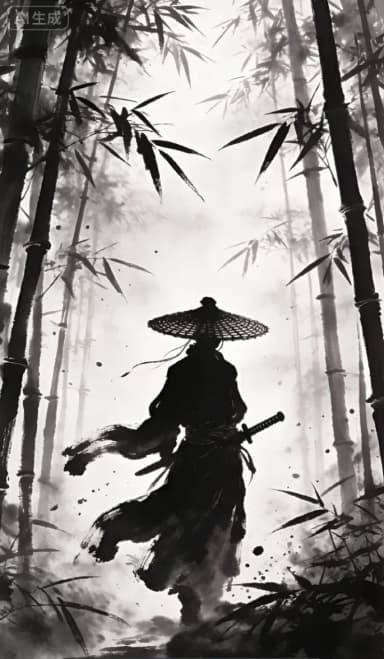
Our translation of the official manual prompt for this formula
(0:00 - 0:03) Camera: medium shot.
Frame: continue the ink-wash bamboo-forest scene of @Image1. The swordsman in a straw hat and ink-black robe, his silhouette standing at the centre of the swirling fog and the swaying bamboo shadows.
Action: his left hand rests lightly on the hilt; bamboo leaves drift down on the wind.
Mood: silent, oppressive; the grain of the ink wash clearly visible.
The beat is written as labelled lines, and the labels are chosen per beat rather than fixed: only Camera opens all five. Frame and Detail appear in most; Story, Action, Fight, Mood and On-screen text come and go as the beat needs them. What's stable is the shape — camera first, then a labelled line per concern, one concern per line. Note also that Frame is used here to say continue @Image1, not to redescribe it. The second beat shows the labels shifting as the story arrives:
(0:03 - 0:08) Story beat. Camera: close-up.

Story: the swordsman senses killing intent.
Frame: the camera pushes in fast to a close-up under the hat.
Detail: at the hat's edge, a pair of fierce, resolute eyes, a gaze like a blade. An ink-wash "bead of sweat" slides down his forehead.
Action: his right hand slowly tightens on the hilt, knuckles whitening. The bamboo leaves fall faster.
Two things generalise. First, the adverbs are doing the work — push in fast, tighten slowly, leaves falling faster: degree and speed, exactly as the formula asks. Second, the prompt closes by naming the source image again and instructing that its black-and-white ink style hold for the whole clip. With a first frame, the style instruction is a preservation instruction.
Formula 4 — Sound: voice, effects, score
Wan 3.0 generates audio natively, so sound is not post-production — it's prompt text. The manual gives one formula with three sub-formulas under it, and the sub-formulas are the useful part:
Prompt = voice + sound effects + BGM

voice        = "what the character says" + emotion + intonation
             + pace + timbre + accent
sound effect = material of the source + the action + the ambient space
BGM          = the score itself + its genre
Voice. Six slots, and the first is non-negotiable: write the actual words. The manual's example is a man doing stand-up who says "Study hard, improve every day" — tone relaxed, pace moderate, voice clear and bright, American English. Note that the accent slot is independent of the language of your prompt, and that "timbre" is describable in ordinary words — the manual elsewhere offers a low mixed voice, a cute voice.
Sound effect. The three slots exist to stop you writing "a thud". The manual's example: a small glass ball falls from a table onto a wooden floor, making a "bang", in a quiet indoor environment. Material, action, room. Change the material to rubber and the same sentence produces a completely different sound; leave the material out and you get an average of all of them.
BGM. The shortest sub-formula, and the manual's example shows it belongs attached to a scene, not floating: a rainy night, a grim narrow corridor with a window at the far end, scored with suspense-style background music. The scene and the genre in one breath.
One case the formula's three sub-formulas don't cover is audio that arrives as an upload rather than a description — for that, the manual's reference table has a dance entry that hands Wan an audio file and then spends the whole prompt describing how the body should answer it:
Our translation of a manual prompt in the same register
Vertical 9:16, full-body shot, fixed stable camera. A young woman with long black hair, in a white long-sleeved top with floral embroidery, a white pleated skirt with a black belt and white platform trainers, dances idol-style to the beat of the supplied audio in a modern minimalist kitchen. Background: light grey cabinets, a white island, dark night windows; a square fill light behind her forms a rim light; cool white indoor lighting.
Choreograph to the rhythm, tempo and emotional swells of the supplied audio: downbeats get crisp, large movements and held poses; softer passages get gentle body waves and hand shapes; the chorus gets denser, more explosive movement. Idol-style dance throughout — continuous, fluent, rhythmic and expressive, fully synchronised to the beat of the audio.
Smooth motion, natural limb proportions.The second paragraph is a mapping, not a description: downbeat → this kind of movement, quiet section → that kind, chorus → denser. That's the general move for any uploaded audio — you're not describing the music, you're telling Wan how the picture should respond to each of its states.

Create AI videos with Pixo
Turn any idea into a publish-worthy video. One sentence is all it takes.
Formula 5 — Reference: @ the asset, then direct it
Reference-to-video keeps your uploaded people, places and voices consistent across the generated clip. The formula is three slots:
Prompt = @referenced asset + action + dialogue- @referenced asset — cite uploads by number in upload order:
@Image1,@Video2,@Audio1. The manual's key tip: you may @ the same asset multiple times, at different points in the prompt, and that's how you make the binding precise rather than approximate. An @ isn't a declaration you make once at the top — it's a pointer you drop wherever it applies. - Action — the referenced subject's motion state: stillness, a shift in expression or emotion, a body movement, an external force acting on them, a change of position. A reference image is a pose, and without an action slot the model tends to animate around that pose rather than out of it. Naming the motion state is what converts a still into a performance — and "stillness" is a legitimate answer, not an empty one.
- Dialogue — what they say. One speaker or several in conversation, and the timbre can itself be a reference: "voice timbre referencing @Audio1".
Two variants sit under the same formula:
- Video-timing reference — reference the temporal content of a clip rather than its subject: the action, the camera move, the effect. The manual's phrasing: "reference the camera work of @Video1".
- White-model (previz) reference — feed in a grey-box 3D preview and convert it to a finished shot. The manual supplies the sentence to copy: "Turn this 3D preview video into a finished film; replace [X] in the preview with [Y] character."
The manual's own fairy-tale example is the compact demonstration of all three slots at once:
A childlike fairy-tale scene. @Image1 is bouncing and playing on the grass; @Image2 is playing the piano under an apple tree beside them; an apple falls onto @Image2's head; @Image1, referencing the timbre of @Audio1, points happily at @Image2 and says: "You're going to become a scientist!"
Three assets, six @ mentions, one line of dialogue written out in full. @Image1 appears twice — once as the subject of an action, once as the speaker — and @Image2 three times, as pianist, as the head the apple lands on, and as the thing being pointed at. That's the "@ it again where it applies" tip in practice: the asset is re-cited at every point it participates, not declared once.
Here's the same grammar applied to a storyboard image, from the manual's reference table. One uploaded storyboard sheet becomes six shots:
Our translation of the official manual prompt for this formula
Referencing the storyboard in @Image1. Shot 1: wide of a small railway platform on a rainy night — a long-haired girl stands alone under a blue umbrella, warm light spilling from the station house behind her, green hills lost in the rain-mist beyond. Shot 2: medium — the girl with her umbrella and a short-haired boy with a schoolbag stand facing each other on the platform, rain pouring down, the track running away between them. Shot 3: shot through the transparent umbrella canopy with raindrops sliding down it, a close-up of the girl's face; her eyes are red-rimmed and she says softly {Message me when you get there}. Shot 4: over the boy's shoulder toward the girl — in the distance a train comes slowly on with its headlight lit, the halo spreading through the rain. Shot 5: close on their hands as the girl presses a folded note into the boy's, her fingertips trembling slightly. Shot 6: the girl alone at the platform edge, watching the track run away into the distance, the boy no longer beside her, the rain easing.Note the dialogue braces — she says softly {Message me when you get there}. The manual uses braces to fence the exact spoken line off from the surrounding description, which is a useful habit in any prompt where narration and dialogue sit in the same sentence.
Formula 6 — Multi-shot: the prompt as a shooting script
The last formula is the one the 20,000-character budget exists for. It generates a coherent multi-shot narrative in a single generation, holding subject, scene and mood consistent across the cuts:
Prompt = overall description + shot number + timestamp + shot content- Overall description — a short summary of the whole video: theme, narrative style, dominant emotion, the core event. It exists so the model has a global read before it starts on shot 1, and it's what keeps shot 7 in the same film as shot 1.
- Shot number — number every shot. This is the structural spine; without it a long prompt reads as one continuous run-on and the model decides where the cuts go.
- Timestamp — the time range each shot occupies, which is what ties the shot list to the actual output length. Ten shots in 30 seconds is a different film from three, and the timestamps are how you say which.
- Shot content — for each shot, the concrete behaviour of the people and objects in it: action, speech, expression, posture. Inside a shot, you're writing a normal single-shot prompt — the earlier formulas apply unchanged.
The manual's worked example is deliberately small, so the structure is visible:
Told from a third-person perspective, this is a short drama about giving up and finding hope again. Shot 1 [0-3s] A boy sits alone in the corner of a playground, head down over a letter in his hands, then sighs quietly, a lost look in his eyes. Shot 2 [4-6s] Hard cut, fixed camera, focused on the boy's eyes — tears glinting, full of loss and helplessness. Shot 3 [7-10s] Hard cut, the scene moves to a plain classroom. A girl with a gentle, steady gaze, dressed simply, a gentle and steady smile on her face, walks over to comfort him.
One summary line, then three shots that each carry a number, a bracketed time range, the transition into them, the camera, and the performance. Ten seconds of film in four sentences.
Scaled up, the same skeleton produces a 30-second short. The manual's West-Coast one-take opens with the overall description plus a character block, then four numbered shots with time ranges — and every shot after the first opens with "No cut", which is how a shot list produces a continuous take instead of four separate ones:
Our translation of a manual prompt in the same register
A 30-second, film-grade, high-intensity one-take visual spectacle. Overall style: "West Coast street fantasism" — a visual language crossing the grain of 90s street-skate video with the polish of a modern commercial blockbuster. Grade the whole film for extreme "California sunshine": a saturated blue sky in hard contrast with palm-tree shadows under direct sun, the air carrying the heat of the asphalt, the metallic scrape of shopping-cart wheels and a fearless adolescent defiance. Spatial perspective stretches as the hero accelerates; the camera builds visual force through extremely low-angle following and high-speed physical travel through the scene.

The hero is a stylish kid in a colour-blocked striped shirt and a black baseball cap, his expression flipping from slack and lazy to euphoric as he breaks his limit; in the second location the hero is the same kid, but appearing in the real dimension in the posture of an observer.

Shot 1, 0-6s:
Open on a close-up — the kid lounging inside a red steel shopping cart, behind him a straight, iconic California boulevard and towering palms. As the music breaks, the camera executes an extremely fast pull-back and sinks to ground level, hugging the wheel at a very low angle. The kid starts bombing the steep road, the cart hammering over the surface, cars on both sides tearing away behind him, the camera catching an almost deranged sense of acceleration.

Shot 2, 7-15s:
No cut. The camera follows tight to the ground like a skater, and at the instant he clears a rough plywood ramp it rides the movement up in a graceful parabola. The cart launches into the air; the camera passes beneath it. Ahead, a giant billboard rapidly fills the entire field of view, and the camera drives at it in an improbable "crosshair" push, aimed straight at the billboard's centre.

Shot 3, 16-24s:
No cut. The kid and the cart embed themselves directly into the giant billboard, breaking the dimensional wall. At the instant of contact his three-dimensional body flattens; real paper-tear texture and colour-glitch ink appear in frame. Still holding his riding posture, he has become a flat piece of artwork on the billboard. The camera now executes a 180-degree horizontal orbit, then dives from height back down to ground level.

Shot 4, 25-30s:
No cut. The camera lands smoothly on the street directly beneath the billboard, where another, "real" version of the kid appears. He stops, slowly tips the brim of his cap down, and looks up at his frozen self on the billboard with a faintly amused smile. The camera follows his eyeline in a fast zoom-in and settles on the torn hole beside the word "WAN" on the billboard. The score fuses a high-energy hip-hop beat with the physical sound of film spooling; the visual information is highly condensed and full of fashionable rebellion.The same numbered-shot header also works with a single shot, which is how the manual writes its comedy entry — one 30-second take whose entire structure is fast pans between two faces, declared once in a header and then executed line by line:
Our translation of a manual prompt in the same register
Shot 1 [0s-30s]
Close-up, eye-level, continuous fast pans, one take (a single unbroken camera move):
On the left of frame, a director in a black fashion-forward director's vest and a high-end professional headset, a huge professional cinema camera set below and to his left. On the right, a well-connected pretty-boy actor in immaculate makeup, a fashionable Korean comma fringe and a bespoke suit. The background is a spacious professional soundstage: a huge green screen, several towering film-grade C-stands, tangled cables, and gaffers, makeup artists and other crew moving busily through it.
Professional soundstage lighting. A soft LED softbox source spills in from the right, lighting the principals' faces evenly, the scene's colour full and rich. The camera gear and green screen in the background cast faint shadows under ample stage light, giving the real, busy texture of a modern big-budget set.
The full prompt continues into a single long paragraph that alternates a director's line with a whip-pan to the actor's face and a described reaction, six times over — dialogue written out in full each time, and "do not cut" repeated at every pan. When one shot has to carry a whole film, the repetition is the instruction.
The style library: twelve looks and what triggers them
The manual's opening table is twelve entries, each a genre with a full prompt and the clip it produced. Read as a reference, it's a phrasebook: the second column is the phrase that actually sets the look, and it almost always sits in the prompt's first sentence.
| # | Style | The phrase that triggers it | Clip |
|---|---|---|---|
| 1 | Emotional realism | you can even see the real texture of the skin + a slight breathing sway, as if handheld | |
| 2 | Mystery / thriller | a modern-suspense cinematic long take + a strong pale-green filter look | |
| 3 | Comedy short | continuous fast pans, one take (a single unbroken camera move) | |
| 4 | Creative / concept short | a 30-second film-grade high-intensity one-take visual spectacle | |
| 5 | Sci-fi animation | hyper-real CGI + biomechanical structure + high-contrast cinematic lighting | |
| 6 | Disaster movie | true cinematic texture + overall mood referencing a Hollywood disaster-monster blockbuster | |
| 7 | Absurdist short | full of deadpan humour and absurdity + strictly follow a bright teal-and-orange palette | |
| 8 | Stylised 3D animation | a 3D-animated fantasy short in four shots + a named palette: cyan-blue, ink-green, moon-white | |
| 9 | Fine 2D animation | a refined Japanese-style 2D cartoon short + dramatic backlighting | |
| 10 | 2D sports anime | 2D animation with the texture of a Japanese sports anime | |
| 11 | Dark fantasy | 3D-animated short, 30 seconds, dark-fantasy subject, single shot + cold white moonlight as a hard key, high-contrast low-key lighting | |
| 12 | Hand-drawn animation (the manual's "claymation" row) | hand-drawn animation, oil-paint brushwork, cool colour palette |
A few notes on reading this table. Row 12 is labelled claymation in the manual, but its prompt asks for hand-drawn oil-brush animation — the label describes the table row, the prompt describes the output, and it's the prompt that decided the look. Rows 3, 4, 6 and 12 are the same clips used as examples earlier in this post; the manual reuses them across sections too.
More usefully: notice how few of these are single words. The ones that hold up over 30 seconds pair a medium ("2D animation", "3D short", "cinematic long take") with a light or colour rule ("high-contrast cinematic lighting", "teal and orange", "cold white moonlight as a hard key"). "Cyberpunk" on its own gets you a guess; "cyberpunk, high-contrast neon key, low-saturation shadows" gets you a look you can repeat across shots.
Putting the six together
The formulas nest rather than compete. In practice:
- Start basic. Subject, scene, motion. If the one-liner is already close, you're done — Wan 3.0 genuinely makes films from single sentences.
- Add the advanced slots where the output disappointed you. Flat-looking? That's aesthetic control. Generic? That's stylisation. Silent or wrongly scored? That's the sound slot.
- Pick your input mode before writing. First/last frame or references — never both. With a frame, drop everything but motion and camera. With references, @ them repeatedly and write dialogue in full.
- Reach for the multi-shot formula when the idea has a middle. Overall description, numbered shots, timestamps, content. Add "No cut" between shots if you want one continuous take instead of a sequence.
Run this on Pixo
- Sign up at pixo.video — new accounts start with free credits.
- Open the Playground and pick Wan 3.0 as the model.
- Paste any prompt from this guide, attach your reference files, and generate — 2 to 30 seconds, 480p to 1080p, with native audio.
Generate AI summary
From idea to finished video.
In one conversation.
Start CreatingNo credit card required • Free 200 credits