Meet Your AI Video Director
Pixo introduces the AI Director — an autonomous agent that plans, creates, and refines videos from a single prompt, while you stay in full control.

The Agentic Era of Video Creation
Claude Code lets developers write code with natural language. Cursor lets AI edit your project directly. Pixo brings the same experience to video creation.
Not a tool where you click every button. An AI Director agent that understands your creative intent and autonomously executes the entire production. You describe your vision, it makes the video. Want to take over? Jump in at any time.
You and AI share the same workspace. Everything the AI Director can do, you can do manually. Everything you can do, the AI Director can handle for you. There are no "AI-only features" and no "manual-only operations" — you decide where to hand off and where to take control.
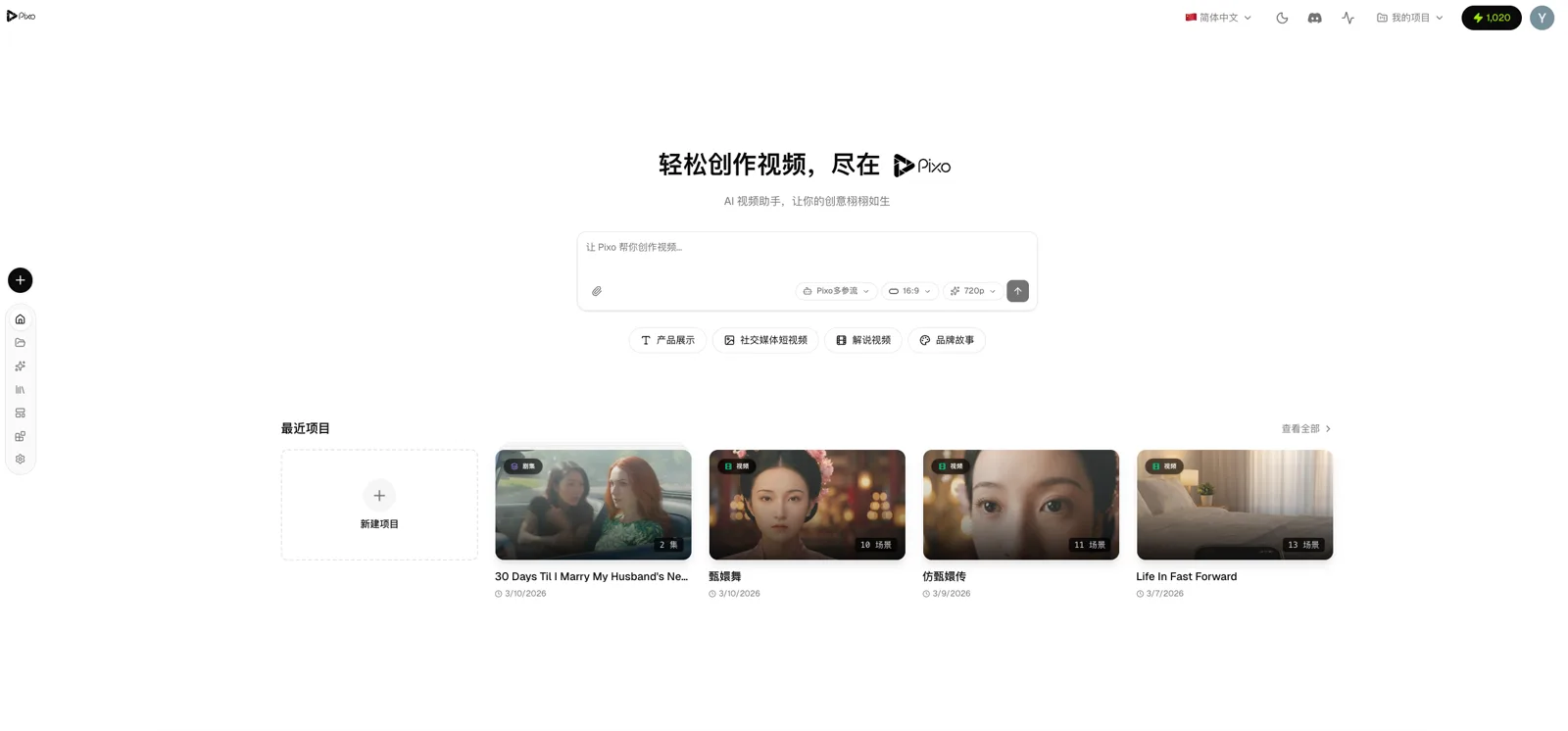
The AI Director: Pixo's Core
Create Like You're Talking to a Real Director
Open a project and describe what you need in plain language. The AI Director understands the full project context, plans autonomously, and executes:
You: "Create a 30-second coffee brand story, cinematic style, warm tones"
AI Director:
- Breaks it into 6 shots, sets scenes and durations
- Creates a "barista" character asset with reference images
- Generates visuals and video for each shot
- Adds background music and sound effects
- Reviews quality of each shot, auto-corrects unsatisfactory results
You say one sentence. The AI Director does the rest.
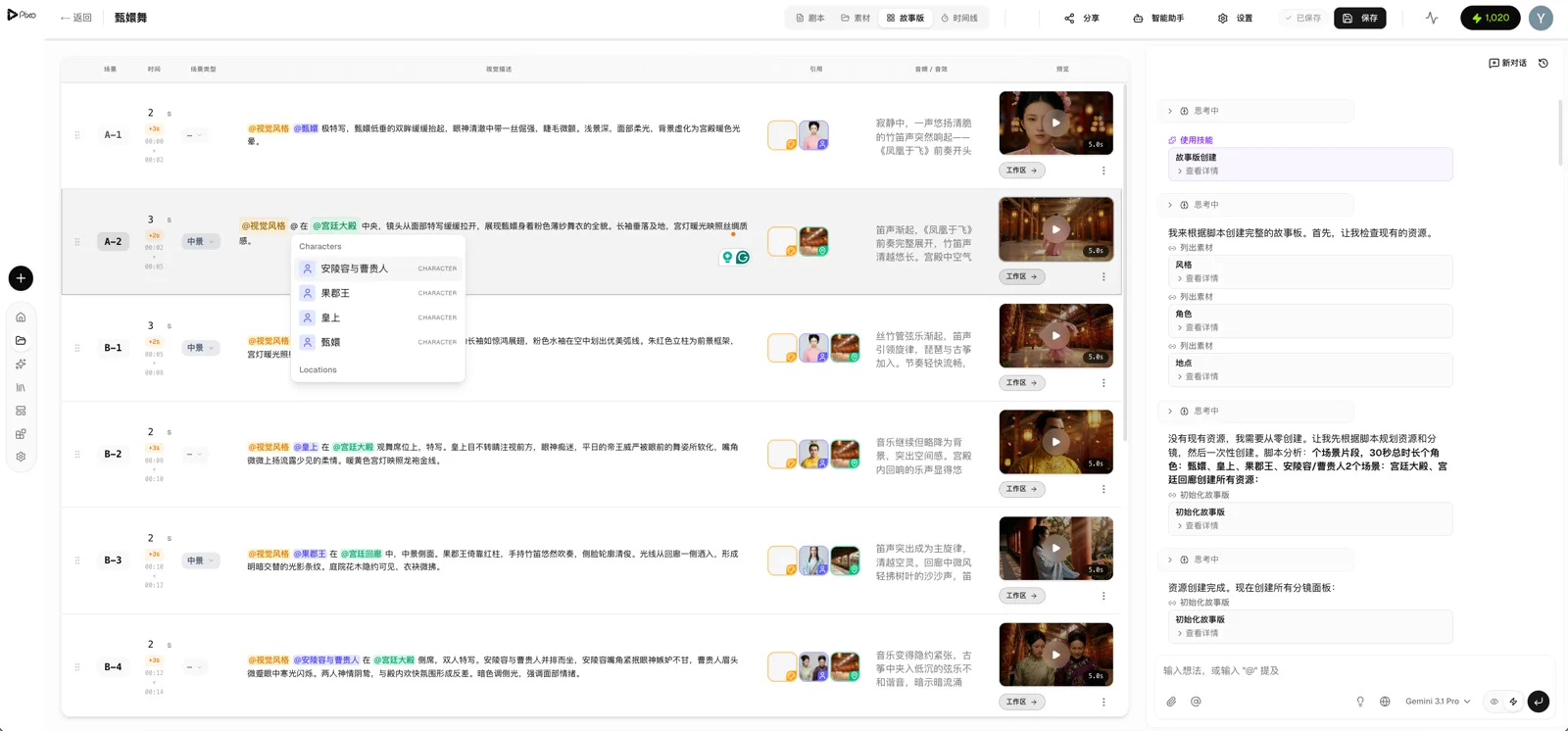
Not Just Chat — Autonomous Action
Traditional AI tools just answer questions. Pixo's AI Director operates your project directly:
| You Say | AI Director Does |
|---|---|
| "Speed up the pace" | Shortens each shot duration, adjusts visual rhythm |
| "Try a different angle on shot 3" | Changes to low-angle, regenerates the visual |
| "Add warm lighting to all indoor scenes" | Batch-updates descriptions, regenerates each one |
| "The expressions look unnatural" | Reviews visuals, adjusts prompts, regenerates |
| "Add a voiceover narration" | Generates speech, adds it to the matching shot |
| "Start from this script" | Parses the script, auto-generates full storyboard |
Just like Claude Code reads your codebase, modifies files, and runs tests — Pixo's AI Director reads your storyboard, modifies shots, generates content, and reviews quality. This is what makes an agentic AI video generator different from a simple text-to-video tool.
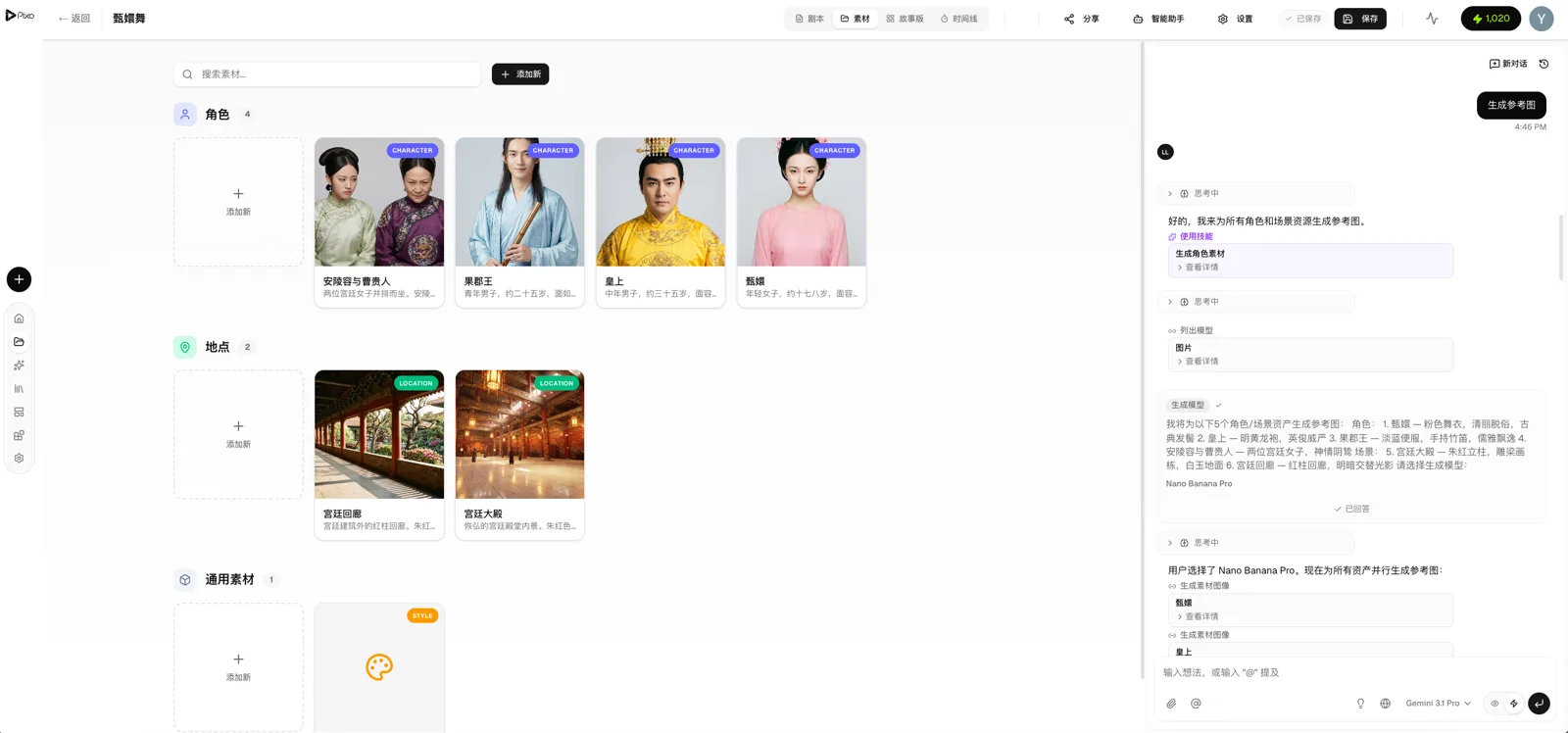
Your Project, Your Rules
Pixo's core philosophy: creators always retain full control.
The AI Director is not a black box. It operates the same editor you see on screen — the same storyboard panel, the same asset library, the same timeline. You can:
- Let the AI Director complete the entire project from scratch — you just do the final review
- Build the storyboard skeleton manually, then let the AI Director fill in the details
- Jump in mid-generation to tweak a shot, then let the AI continue from there
- Create entirely by hand, calling on the AI Director only when you need help
No lock-in, no irreversible actions. Every step the AI Director takes can be undone, overridden, or redone manually. Creative control stays with you.
Two Collaboration Modes
Auto Mode — The AI Director executes directly without step-by-step confirmation. Great for rapid prototyping and batch creation. Like Claude Code's auto-accept.
Review Mode — The AI Director presents its plan first and waits for your approval before executing. Ideal for polishing and high-stakes projects. Like a code review workflow.
Switch between modes at any time. You decide the division of labor.
Deep Thinking and Web Search
- Thinking depth control — Adjust the AI's reasoning depth (off / low / medium / high) for complex creative tasks
- Web search — The AI Director can search the web for inspiration, references, and current trends
New to AI video generation? Start with our step-by-step tutorial to create your first video in 10 minutes.
Agent-Driven End-to-End Workflow
The AI Director isn't a standalone feature — it's the engine behind the entire production pipeline. Every capability is both the AI Director's tool and yours. Every ability the AI Director calls on, you can use directly; every step you do manually, the AI Director can take over.
From a single prompt, the AI Director executes the full pipeline: Script → Storyboard → Assets → Images → Video → Audio → QA Review → Auto-Fix → Export. The result is a finished video, ready to share.

Create AI videos with Pixo
Turn any idea into a publish-worthy video. One sentence is all it takes.
The AI Director's Toolbox
Multi-Model Video Generation
The AI Director has access to the most comprehensive model selection in the industry, auto-matched to each task:
| Type | Models |
|---|---|
| Image | Flux Pro, Imagen 4, Seedream |
| Video | Kling 3.0, Veo 3.1, Hailuo, Seedance, Sora 2 |
| Voice | ElevenLabs multi-voice |
| SFX / Music | AI sound effects and music generation |
Compare up to 4 models side by side and pick the best result. The AI Director can also auto-select the optimal model for each scene. Learn more in our multi-model generation guide.
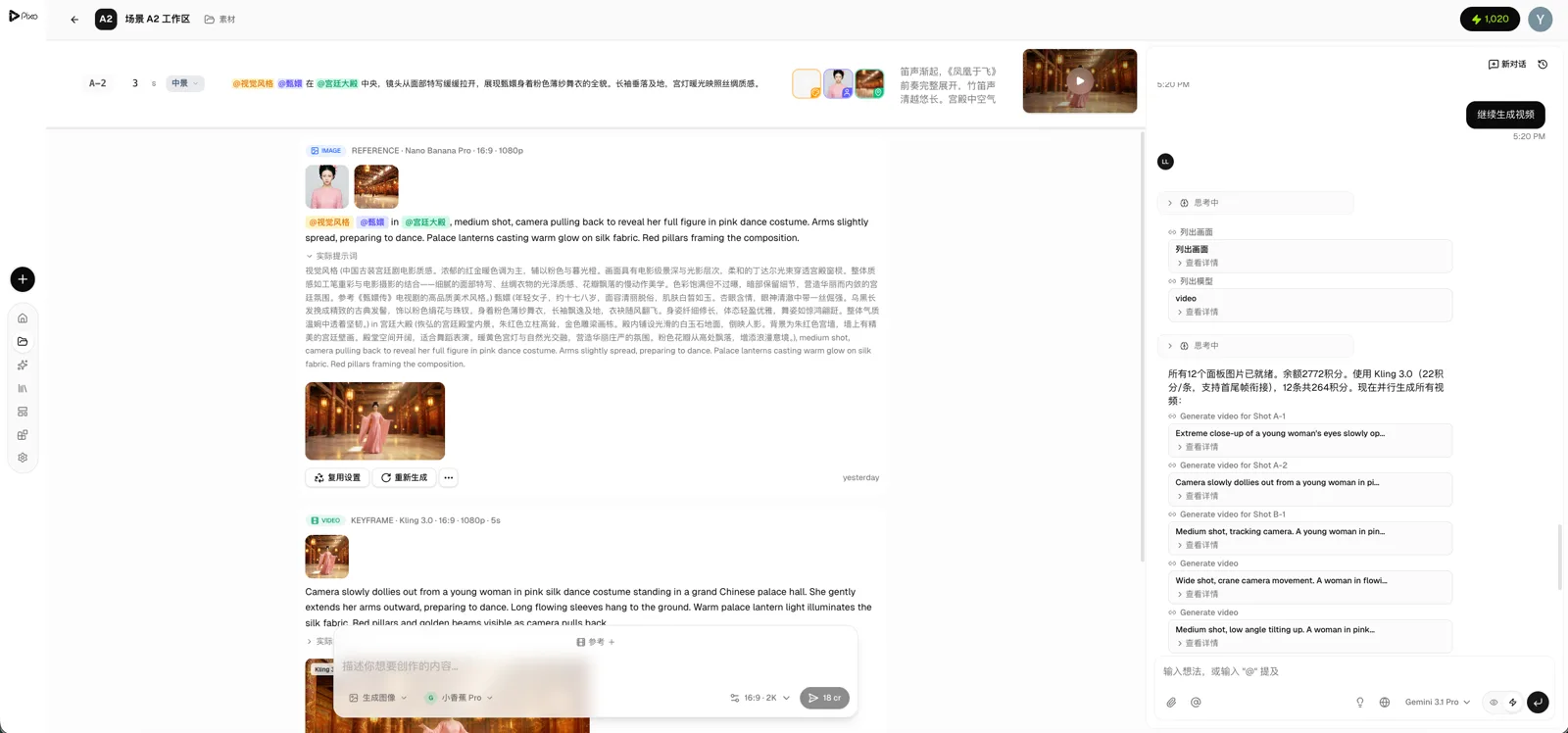
Not sure which model to use? Let the AI Director choose — it analyzes your scene description and selects the best-fit model automatically.
Asset Consistency System
The AI Director automatically manages character and scene assets, ensuring the same character looks consistent across all shots.
Reference assets with @character-name in your prompts, and the AI uses the asset's reference images during generation. For example: @Lin Feng stands in front of @Coffee Shop, warm sunset light.
The AI Director creates and maintains the asset library automatically — or you can upload your own reference images.
Shot Continuity
The AI Director automatically handles keyframe transitions between shots:
Last frame of one shot → automatically becomes the first frame of the next.
No more jarring jump cuts in AI video — every transition is seamless.
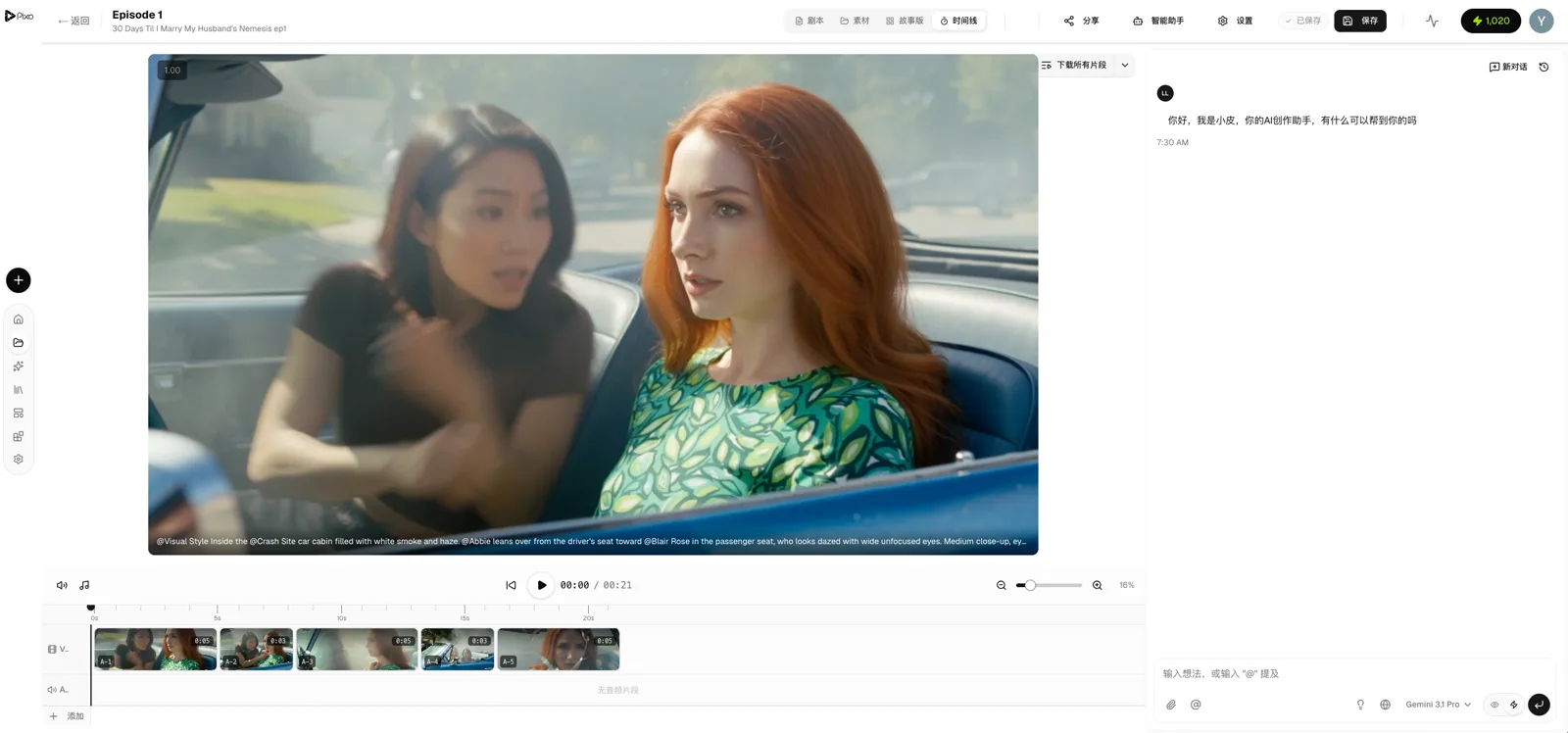
Professional Storyboard Editor
The editor the AI Director operates is the same one in front of you:
- Four views — Script, storyboard grid, asset management, timeline
- Per shot — Visual description, dialogue, shot type, duration, camera movement
- Drag to reorder — Freely rearrange shot order
- Real-time collaboration — Multiple people editing simultaneously, CRDT auto-sync
The AI Director's edits appear in real time. You can jump in to modify anything — the AI Director understands your changes and continues from there.
Timeline and One-Click Export
- Preview the full video
- Independent volume control (video track + audio track)
- Drag to rearrange clips
- One-click export to MP4
7 Style Presets
| Style | Effect |
|---|---|
| Cinematic | Hollywood blockbuster quality, dramatic lighting |
| Cartoon | Bold colors, clean animation style |
| Anime | Japanese animation aesthetic |
| Photorealistic | Photo-grade realism |
| Watercolor | Soft painted texture |
| 3D Render | Modern CGI digital art |
| Retro | Nostalgic film grain |
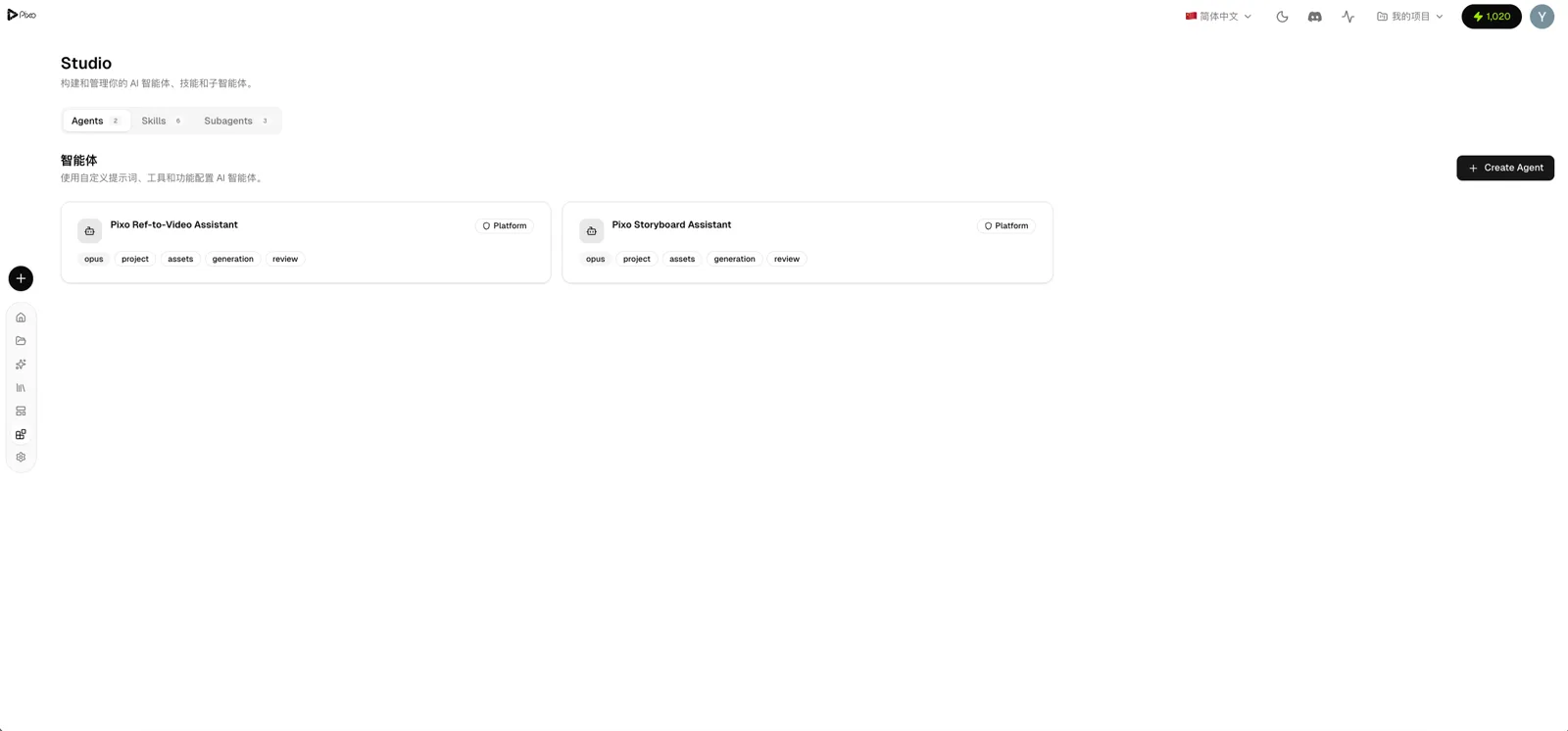
Customize Your AI Director
Build specialized AI Directors in the Studio:
- System Prompt — Define the AI Director's creative style and preferences
- Model Selection — Choose the underlying AI model powering the agent
- Skills — Attach specialized skills to the agent
- Sub-agents — Configure dedicated sub-agents for specific tasks
A short-film director, a commercial director, a tutorial director — each purpose-built for the job.
Use Cases
| Scenario | How the AI Director Helps |
|---|---|
| Short Films | Auto-generate full storyboards from scripts, produce visuals and video shot by shot, manage multi-episode series |
| Social Media | One sentence to create TikTok / Instagram / YouTube Shorts, auto-format for vertical video |
| Product Demos | Describe your product features, AI generates professional showcase videos |
| Educational Content | Input key concepts, AI generates explainer visuals with voiceover |
| Brand Stories | Describe your brand vision, AI creates cinematic narrative films |
Collaboration and Teams
- Team workspaces — Create teams, invite members, tiered permission management
- Real-time collaboration — Multiple people editing simultaneously, auto-sync
- Share links — One-click public links with optional password protection
- Template sharing — Share standout projects as community templates
Why Pixo?
| Other AI Video Tools | Pixo |
|---|---|
| Either all-manual or all-AI | Human and AI share the same workspace, flexible division of labor |
| Single model | Multi-model comparison, pick the best |
| Characters look different every time | Asset system maintains consistency |
| Jump cuts between shots | Automatic keyframe continuity |
| Can only generate single clips | Script → Storyboard → Generate → Export, end to end |
| No creative guidance | AI Director understands context, proactively suggests ideas |
| Start from scratch every project | Template library + AI Director remembers project context |
The core difference: other AI video makers give you a black box you operate, or that operates without you. Pixo lets you and the AI Director share the same creative space — you decide who leads.
Want to see how AI is transforming the broader video landscape? Read our deep dive on the AI video revolution.
Get Started
Claude Code lets you code by conversation. Pixo lets you create video by conversation.
Want to hand everything to the AI Director? One sentence is enough. Want to polish every shot yourself? Every tool is at your fingertips.
Sign up and start creating — free daily credits included.
Generate AI summary
From idea to finished video.
In one conversation.
Start CreatingNo credit card required • Free 200 credits